Email PDF of screen without (and with) a Flow
The need to send a screenshot (it could be a form, invoice or anything else) as an email attachment straight from Power Apps is highly useful.
The process actually is very simple using the PDF() function. Firstly, a temporary variable needs to be created with the file content and that used to form the email attachment. This one is to the user, but could be to any address.
With(
   {_PDF: PDF(ScreenName)},
   Office365Outlook.SendEmailV2(
      User().Email,
      "Subject here",
      "Body here",
      {
         Attachments:
        {
            Name: "PDFFileName.pdf",
            ContentBytes: _PDF
        }
     }
  )
)
Note also you can send the same content to a Flow, but need to convert it to Base64.
With(
   {
      _PDF:
      With(
         {
            _JSON:
            JSON(
               PDF(ScreenName),
               JSONFormat.IncludeBinaryData
            )
         },
         Mid(
            _JSON,
            Find(
               ",",
               _JSON
            ) + 1,
            Len(_JSON) -
            Find(
               ",",
               _JSON
            ) - 1
         )
      },
      AttachFileFlow.Run(
         _PDF,
         User().Email,
         "Test Subject",
         "Test Body",
         "TestFile.pdf",
      )
   )
)
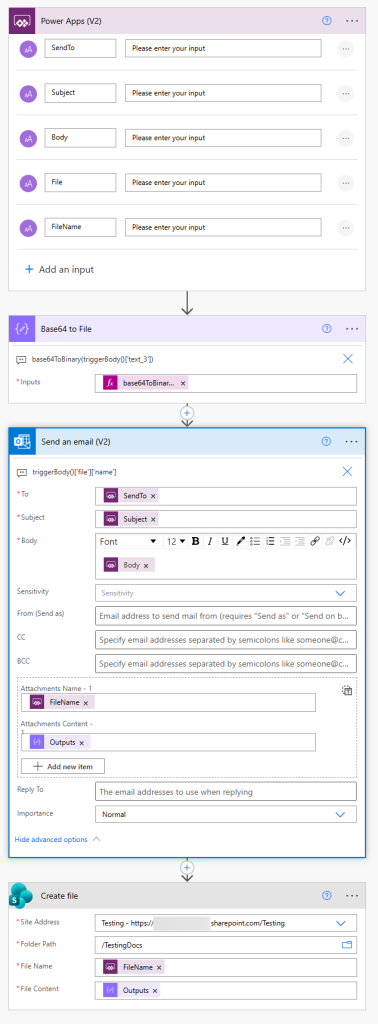
then do a base64ToBinary conversion in the Flow. I have also added an action to create anew file in a SharePoint Library at the bottom.
3 Comments
Jørgen Lauridsen
Hi
This article shows how to email a certain page from an App as a PDF file.
Could you show me how you would save the same page (or the earlier PDF file) in a Sharepoint Document Libary (eg. using Flow)
Wkr Jørgen
Warren Belz
You can use exactly the same name and content in a Create File action in a SharePoint Library as the example in the blog uses as the email attachment.
Warren Belz
You can use exactly the same name and content in a Create File action in a SharePoint Library as the example in the blog uses as the email attachment.