Prevent the use of Special Characters in a Text input
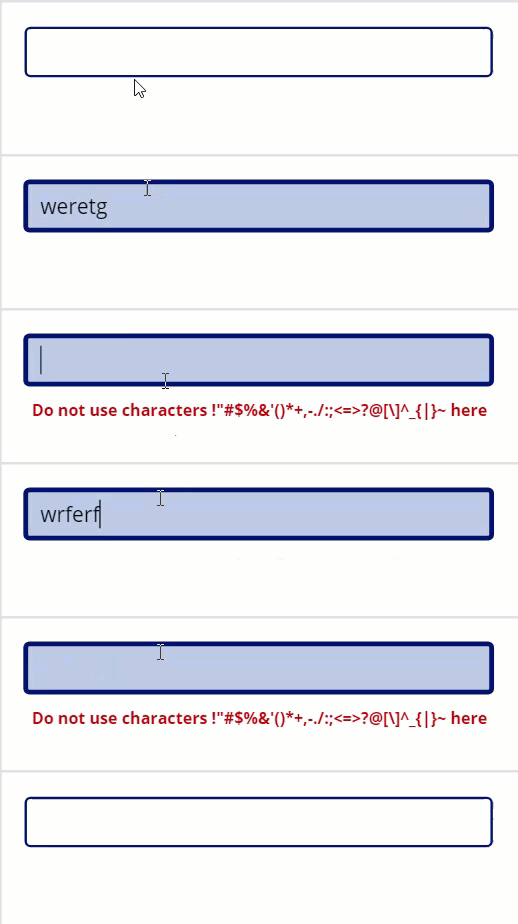
This process prevents a user from saving a range of Special Characters if entered in a Text Input. This may have other application as well as the Text Box example. A working example is shown below
So how does this work?
Firstly do a Collection of all special characters (you can do this at Screen OnVisible) by using their ASCII value ranges.
ClearCollect(
   colChar,
   ForAll(
      Sequence(15),
      {FieldNo: Char(32 + Value)}
   ),
   ForAll(
      Sequence(7),
      {FieldNo: Char(57 + Value)}
   ),
   ForAll(
      Sequence(5),
      {FieldNo: Char(90 + Value)}
   ),
   ForAll(
      Sequence(4),
      {FieldNo: Char(122 + Value)}
   )
)
This puts 31 Special Characters into the collection under the field FieldNo.
Below is a gallery (with wrap at 4) showing the characters
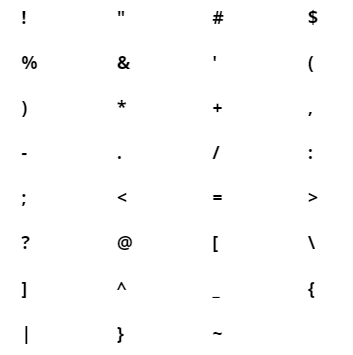
Note you may want to allow some such as Underscore _ (95) and will have to adjust the above to suit.
Now put this on the OnChange of the Text Box
ForAll(
   colChar,
   If(
      FieldNo in Self.Text,
      Collect(
         colError,
         {CharError: true}
      );
      Reset(Self)
   )
)
NOTE – I had to use a Collection here as a Variable cannot be set inside a ForAll() statement.
Put this on the OnSelect of the Text Box – you could also in addition put this at Screen OnVisible
Clear(colError)Now put a Label (this is the warning message) on the screen with this as the Text
"Do not use characters " & Concat(
    colChar,
    FieldNo & ""
) & " here"
and this as the Visible
First(colError).CharErrorThis all should work as displayed in the model at the top.
7 Comments
Kerashin Naidoo
Works really well, thanks for this help!
Jack
What should I change to allow only underscore and @ characters in above script ? Can you help with the code here
Thanks a lot !
Warren Belz
Actually very easy for those two characters as they are at the end of the sets
ClearCollect(colChar,
ForAll(
Sequence(15),
{FieldNo: Char(32 + Value)}
),
ForAll(
Sequence(6),
{FieldNo: Char(57 + Value)}
),
ForAll(

      Sequence(4),

      {FieldNo: Char(90 + Value)}

   ),
ForAll(
Sequence(4),
{FieldNo: Char(122 + Value)}
)
)
Jon
Hi Warren,
Great article and I much prefer this approach than using the IsMatch as it tells you instantly.
You mention in the article that you may want to exclude an underscore _ (95), would you be able to explain how to do this please?
I think it would be really handy for others to know how to add this exclusion in as well.
Also what Character number is a minus symbol – as that could be handy to exclude also.
Is there a chart available that gives you the number/corresponding character somewhere?
Thanks
Jon
Warren Belz
Hi Jon,
To not exclude 95(_) you would change the third set to (4 instead of 5)
ForAll(Sequence(4),
{FieldNo: Char(90 + Value)}
),
As minus sign is 45, so this gets a bit trickier – you need to split one into two parts
ClearCollect(colChar,
ForAll(

Sequence(12),

{FieldNo: Char(32 + Value)}

),
ForAll(

Sequence(2),

{FieldNo: Char(46 + Value)}

),
ForAll(
Sequence(7),
{FieldNo: Char(57 + Value)}
),
ForAll(
Sequence(4),
{FieldNo: Char(90 + Value)}
),
ForAll(
Sequence(4),
{FieldNo: Char(122 + Value)}
)
)
Click here for an example of an ASCII code table
Jon
Hi Warren
I’ve just tried what you suggested to allow the _ and the – and this did indeed work but unfortunately it wouldn’t allow the number 0 to be used either which is a bit weird, here is the list of dissallowed characters it gave me.
Do not use characters !”#$%&'()*+,/0:;?@[\]^{|}~ here
Any ideas on how to allow the number zero, also I guess would also be handy in my region of the UK to dissalow the pound sign £
Really hope you can help again,
Thanks
Jon
Warren Belz
If you have a look at the sequence and then the ASCII chart, you will see that all I am doing is storing the sequence after the base for the correspending characters. If you take this example
ForAll(Sequence(12),
{FieldNo: Char(32 + Value)}
)
I am adding ASCII characters 33 to 44 inclusive (add between 1 and 12 to 32)
*I made an error with the 0 inclusion – instead of
ForAll(Sequence(2),
{FieldNo: Char(46 + Value)}
),
you simply need
{FieldNo: Char(47)}I believe that the pound sign is in your character set is 163 ($ is 36 and excluded), so you just need to add that.